


Your audience already voted. Google just couldn’t see it. Until now.
Every like on your site is a tiny thumbs-up from a real person. Every dislike? Honest feedback. That’s the kind of social proof search engines love to show: star ratings right there in Google results, not fake review widgets scraped from who-knows-where.
But here’s the catch. Turning that engagement into proper Schema.org markup used to mean digging through post settings one page at a time. Fine for one review. A nightmare when you’ve got 200 posts and a Monday morning SEO audit breathing down your neck.
Picture this: you run a plugin review site with 47 posts live. Half of them have star ratings configured. The other half? You’d have to open each one individually just to find out. That’s the kind of busywork that kills good SEO habits before lunch.
So we built something better. A dedicated WordPress schema generator that lives where site-wide jobs belong: inside WP ULike Pro → Tools. One workspace for every post. Zero sidebar clutter while you’re trying to write.
What the Schema Generator actually does for you
Think of it as your structured data command center. Not another checkbox buried in the block editor.
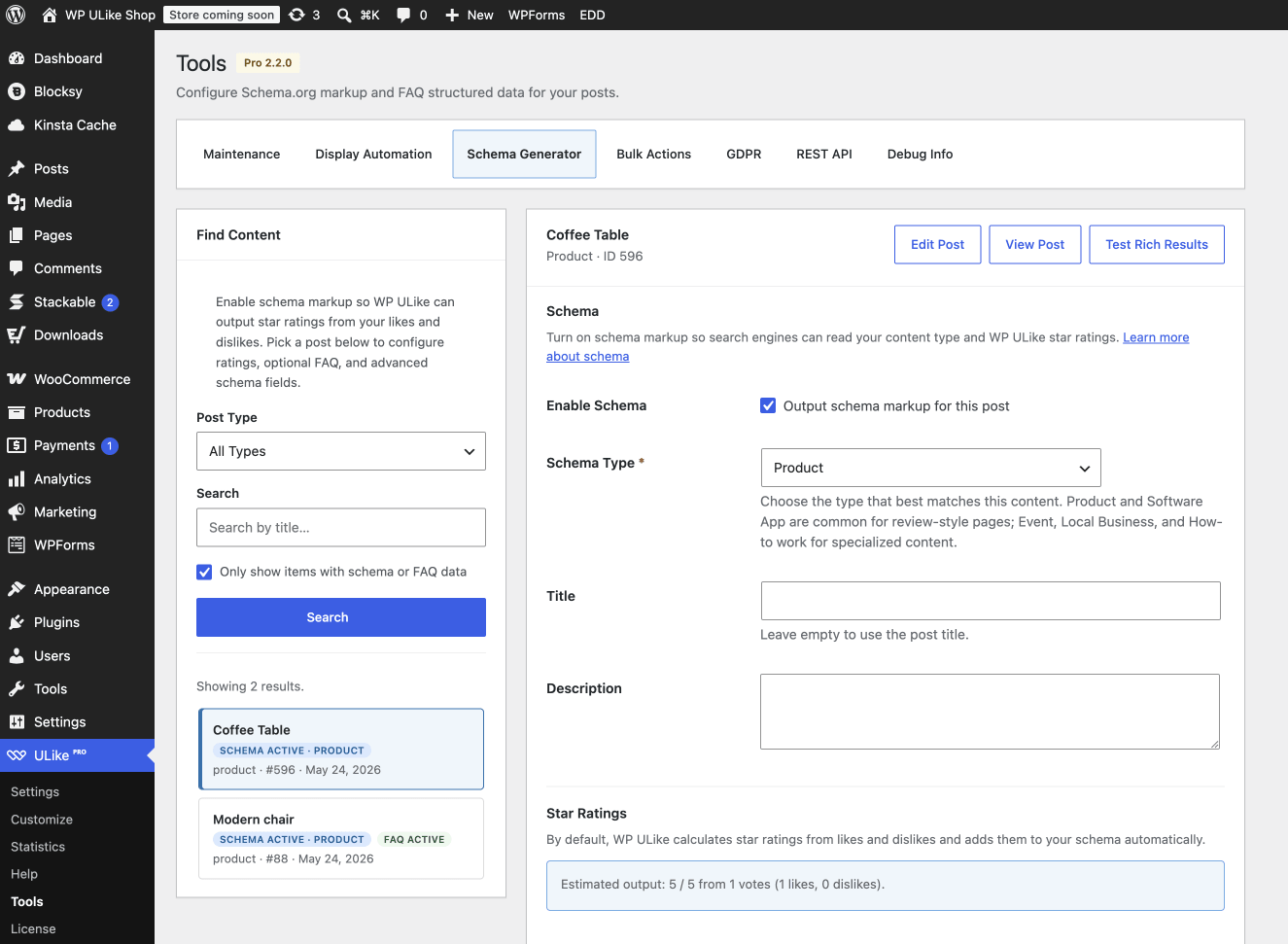
When you open Tools → Schema Generator, you get a workspace built for people who maintain content, not just publish and ghost:
- Search any post by title and filter by post type. No more endless scrolling.
- Configure star ratings, FAQ blocks, and advanced Schema.org fields on one clean screen, so your writing flow stays yours.
- Preview ratings live before you save. You’ll know exactly what Google will read (no publish-and-pray).
- One click to test rich results in Google’s Rich Results Test for the post you’re editing.
- Audit and fix schema at scale, because opening 40 posts individually is how good SEO intentions go to die.
Bottom line: this isn’t a settings panel. It’s a WordPress schema markup workflow that respects your time.
Why we moved schema out of the post editor (and into Tools)
Real talk: the old post meta box wasn’t broken. It worked. But “works” and “works when you have 80 product reviews to audit before lunch” are very different vibes.
Schema markup is a site-wide SEO job. It doesn’t belong in the same mental space as drafting a blog post. When it lived in the editor sidebar, here’s what kept happening:
- Writers saw SEO fields they didn’t need on every post type
- There was no way to search “show me posts missing star ratings” or “find everything with FAQ schema”
- Fixing markup across dozens of pages meant opening each post one by one: slow, tedious, easy to skip entirely
- Your content team and your SEO workflow were fighting for the same screen
By moving schema into Tools, we separate those jobs cleanly. Writers write. Meanwhile, you (or your SEO person) handle structured data in one focused place with search, filters, previews, and bulk-friendly navigation built in from day one.
Already set up schema the old way? Nothing breaks. Your existing schema meta keeps working exactly as before. We just gave it a proper home and a much better interface to manage it going forward.
Turn likes and dislikes into Google-ready star ratings
Here’s where WP ULike Pro’s schema generator stops being “just another SEO checkbox” and starts being genuinely useful.
By default, the Schema Generator pulls your real like and dislike counts, converts them into aggregate star ratings, and injects them into your structured data automatically. From there, your audience votes, Google reads the result, and you never touch a spreadsheet.
Need more control? You’ve got it:
- Automatic ratings: likes and dislikes become a star value search engines understand
- Time-factor rating: weight recent engagement when dislikes are off, so fresher content reflects current sentiment
- Custom star ratings: override with manual values when you want full control
- Disable star ratings: still output schema type and content fields, just without aggregate rating data
Plus, the live rating preview shows you the estimated output before you hit save. That way you’ll know what Google sees before Google sees it.
FAQ schema, rich content types, and the details Google actually reads
Star ratings get the spotlight. But the WordPress schema generator also handles the full structured data picture:
- FAQ schema for question-and-answer pairs that can qualify for FAQ rich results in search
- 15+ Schema.org types including Product, Software Application, Event, Local Business, How-to, Course, Movie, Game, Music Playlist, and Organization
- Smart, type-specific fields so you only see what’s relevant (opening hours for Local Business, event dates for Event, app category for Software Application)
- Custom reviews alongside your aggregate ratings
- Richer output with improved date formatting and more complete fields for types like SoftwareApplication, Event, and Product
Whether you run a plugin review site, a local directory, an event calendar, or a tutorial hub, there’s a schema type that matches how search engines categorize your content. And you pick it without writing a line of JSON-LD.
Set it up in about 2 minutes
There’s no code to write, no JSON-LD templates to wrestle with, and no need to stack a third-party schema plugin on top of everything else. Just follow these steps:
- Go to WP ULike Pro → Tools and open the Schema Generator tab
- Use the sidebar to search posts. Filter by post type, search by title, or toggle “only show items with schema or FAQ data” to audit what’s already configured
- Click a post to load it in the editor panel
- Enable schema, pick your Schema type, and fill in the fields that appear (irrelevant ones stay hidden automatically)
- Check the star rating preview, add FAQ items if needed, and save
- Hit Test Rich Results to validate the live page in Google’s tool
That’s the whole workflow. Two minutes now saves you hours of post-by-post hunting later.
Sound like you? Good. We built this for you.
The Schema Generator is a fit if any of these hit a little too close to home:
- You run a review or comparison site and want star ratings in Google tied to real user engagement, not fabricated numbers
- Schema across dozens of posts gets painful fast. You need a central WordPress schema markup workflow without opening every single post.
- FAQ rich results sound great, but you’d rather not install yet another SEO add-on
- WP ULike already powers your engagement, so that data should work harder for SEO, not just sit in a counter widget
- You’re sick of schema hiding in a sidebar nobody remembers to check
Your likes deserve a spotlight in search
Structured data shouldn’t be a hidden checkbox you set once and forget. It should be something you can find, fix, and scale, especially when your like buttons are already collecting the social proof search engines love to display.
So the Schema Generator in WP ULike Pro Tools brings schema markup, star ratings, and FAQ structured data into one focused workspace: less clutter in the editor, more control for you, and better signals for Google.
Already on WP ULike Pro? Head to Tools → Schema Generator and pick your first post. Those votes have been stacking up. Now put them where search can actually see them.
Not on Pro yet? See what’s included or dig into the documentation for setup guides.
Frequently asked questions
What is a WordPress schema generator?
A WordPress schema generator helps you create Schema.org structured data: the machine-readable markup search engines use to understand your content and show rich results like star ratings and FAQ dropdowns. WP ULike Pro’s Schema Generator goes further by connecting that markup to your actual like and dislike counts, so your engagement data does real SEO work.
Why did schema move from the post editor to Tools?
Because schema markup is a site-wide SEO task, not a writing-time distraction. The post meta box worked for individual pages, but it made it hard to search, audit, and update markup across many posts. The Schema Generator in Tools gives you a dedicated workspace with search, filters, live previews, and one-click rich results testing, built for maintaining structured data at scale.
Will my old schema settings still work?
Yes. Legacy schema meta from earlier setups continues to output correctly. The Schema Generator also gives you a better interface to view and edit that data going forward.
Do I need a separate schema plugin?
If you’re on WP ULike Pro, the built-in Schema Generator covers structured data types, FAQ markup, and star ratings derived from engagement, without stacking another plugin on your site.
How are star ratings calculated?
By default, WP ULike Pro converts your post’s like and dislike counts into an aggregate rating value (typically on a 1–5 scale). You can also enable time-weighted calculation, set custom values manually, or disable star ratings entirely while still outputting other schema fields.
Where do I find the Schema Generator in WordPress?
Navigate to WP ULike Pro → Tools → Schema Generator in your WordPress admin dashboard. From there, you can search posts, configure markup, preview ratings, and test rich results.


Leave a Reply