

Engagement should build trust. Not create a privacy headache you discover six months later.
Every like button on your site touches real people. Sometimes that means a logged-in member. Sometimes a guest leaving a fingerprint, a cookie, or an IP address in your database. If you’re running a site in the EU, the UK, or anywhere with strict data laws, that matters.
So we built WP ULike with a simple rule: you choose what gets stored on your site. Not on our servers. Not in a black box. You pick the logging level, anonymize IPs when you want to, hook into WordPress privacy tools, and handle erasure requests without opening phpMyAdmin at midnight.
This is how WordPress GDPR privacy works in WP ULike and WP ULike Pro: what stays in your database, what you can turn off, and the tools that help you stay compliant while keeping engagement alive.
Your site, your database — not ours
Let’s be clear upfront: WP ULike does not collect or store visitor vote data on wpulike.com servers. Every like, dislike, IP address (if enabled), fingerprint hash, and vote log lives in your WordPress database on your hosting — the same place your posts, comments, and user accounts already sit.
When someone clicks a like button on your site, the request goes to your server. Your plugin writes to your tables. You own the data. You control retention, export, and erasure. We’re not sitting in the middle with a copy of your visitors’ activity.
That’s the self-hosted WordPress model: the plugin gives you the tools, but you are the data controller for everything stored on your install. WP ULike is built for that — not for pulling engagement data into someone else’s cloud.
Security and trust come first
Privacy without security is theatre. Before we talk export and erase, here’s what protects your site day to day:
- Bot detection to block automated vote spam before it hits your logs
- IP blacklist support, including integration with WordPress disallowed comment keys
- Fingerprint-based duplicate vote protection for guests, so one person can’t hammer your counters
- Vote locking to prevent race conditions when multiple requests hit at once
- Prepared SQL and capability checks across admin actions, because vote data deserves the same care as user accounts
On WP ULike Pro, that layer goes further: rate limiting on login, signup, and password reset; reCAPTCHA v2/v3 on forms; two-factor authentication; email verification on signup; and hardened social login flows. Less abuse. Fewer fake accounts. Cleaner data from the start.
But security stops bad actors. Privacy controls are what keep you honest with the people who actually use your site. That’s the rest of this guide.
What gets stored on your site (and why you control it)
When someone likes a post, comment, activity, or forum topic, WP ULike writes a vote log to your database tables (such as wp_ulike, wp_ulike_comments, and related tables). Depending on your settings, each log entry on your server may include:
- A WordPress user ID (for logged-in voters)
- An IP address (full, anonymized, or not stored at all)
- A browser fingerprint hash (for guest duplicate-vote prevention)
- A vote-tracking cookie (when your logging method uses cookies)
- Date, time, and like/dislike status
None of this is hidden. Every major choice lives in WP ULike → Settings, per content type. Because a blog with members-only voting has different needs than a public review site with open guest likes.
Free plugin privacy features
The free WP ULike plugin ships with the core WordPress privacy GDPR building blocks. No Pro license required for these:
Anonymize IP addresses
Found under Settings → Configuration → General, Anonymize IP Addresses masks part of each IP before it hits your database:
- IPv4: the last octet becomes
0(e.g. 192.168.1.42 → 192.168.1.0) - IPv6: the last 80 bits are masked
That’s the same idea Google Analytics uses for IP anonymization: enough to spot broad patterns, not enough to pinpoint one person on their home Wi-Fi.
Do not store IPs at all
Turn on anonymization first, then enable Do Not Store IPs. From that point, vote logs save 0.0.0.0 instead of any real address. Maximum privacy. Still functional for logged-in users who vote under their account ID.
Logging method: your biggest privacy lever
Under each content type in Settings (Posts, Comments, Activities, Topics), the Logging Method decides how much identifying data WP ULike keeps:
- No Limit: no duplicate-vote restrictions; minimal identifying storage beyond the vote itself
- Cookie: tracks votes via browser cookie; good balance for guest sites that don’t need username/IP logging
- Username/IP: ties votes to logged-in users or guest IPs; supports unlike/undislike
- Username/IP + Cookie: combines both for stricter duplicate prevention
When cookie-based methods are active, you also control Cookie Expiration (default: one year). Shorter TTL means less long-lived tracking on returning visitors.
Other privacy-friendly settings
- Restrict to logged-in users per content type: guests can’t vote, so you skip guest IP and fingerprint logging entirely
- Hide likers for anonymous users: logged-out visitors don’t see who liked what (less public exposure of user activity)
- Blacklist integration: block votes from known bad IPs before they become log entries
WordPress personal data export and erase
WP ULike registers with WordPress core privacy tools out of the box. When someone submits a personal data request, your site admin uses the built-in WordPress workflow:
- Tools → Export Personal Data includes a WP ULike section with vote logs (date, status, IP if stored) for posts, comments, activities, and topics
- Tools → Erase Personal Data removes all vote logs tied to that user’s account across every WP ULike table
That’s real WordPress GDPR compliance integration: not a custom export CSV buried in a submenu, but the same export/erase flow WordPress site owners already know from handling commenter or WooCommerce requests.
Important: these core tools cover registered WordPress users matched by email. Guest votes stored only by IP or fingerprint fall outside that flow. More on that below.
WP ULike Pro GDPR tools
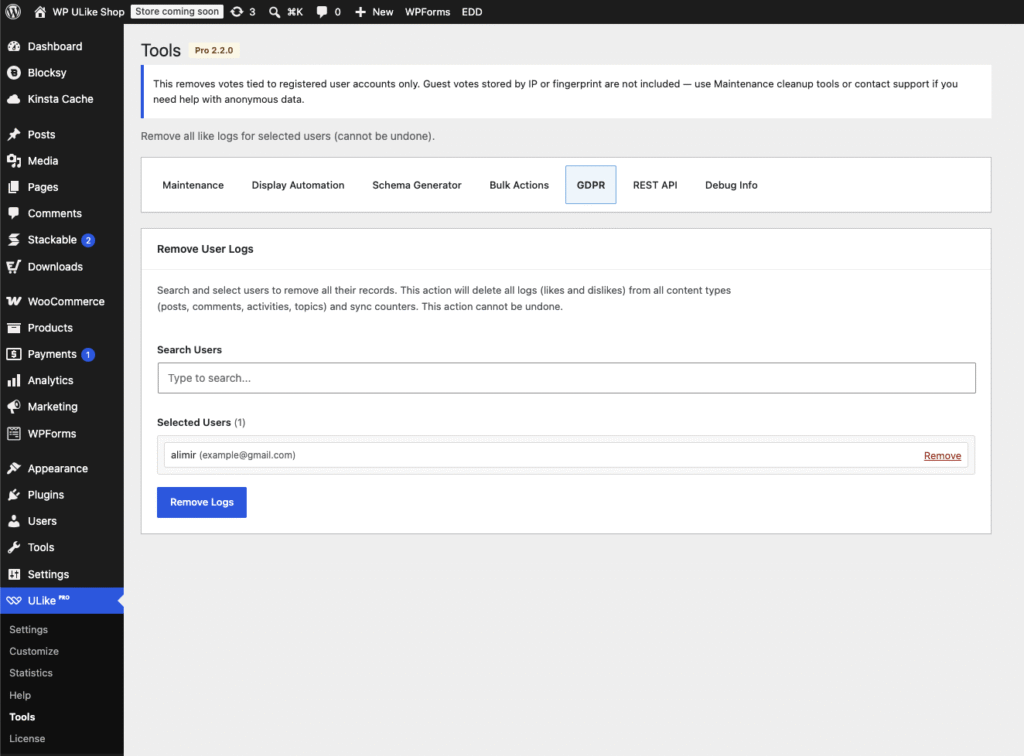
Need to handle erasure at admin scale, not one WordPress privacy email at a time? Pro adds a dedicated GDPR tab under WP ULike Pro → Tools.
Remove User Logs (bulk erasure)
The Remove User Logs tool lets you:
- Search users by login, email, or display name
- Select multiple accounts at once
- Delete all their vote logs across posts, comments, activities, and forum topics in one action
- Sync counters automatically so like counts stay accurate after deletion
Think of it as WordPress erase personal data, but for site admins who already know exactly which accounts need wiping and don’t want to wait on the email confirmation loop.
The tool covers registered user accounts only. Guest data stored by IP or fingerprint isn’t included. For that, Pro’s Maintenance tab offers deeper cleanup options (including deleting all records per content type when you need a full reset).
Pro extras that support privacy
- Maintenance cleanup tools for invalid, duplicate, or expired session data
- Debug Info that deliberately excludes passwords, license keys, IPs, and user statistics from exported reports
- anonymize_user shortcode argument on Pro item lists to show hashed pseudo-IDs for guests instead of real profile links
- REST API controls with role permissions and API key management, so vote data isn’t wide open by default
A practical privacy setup (pick your level)
Not sure where to start? Here are three sensible configs depending on how strict you need to be:
Level 1: Public blog, low friction
- Logging method: Cookie
- Anonymize IP: On
- Do Not Store IPs: your call (on if you want zero IP retention)
- Cookie expiration: shorten from one year if your policy requires it
Level 2: Membership or community site
- Restrict voting to logged-in users where possible
- Logging method: Username/IP for unlike support
- Anonymize IP: On
- Rely on WordPress Export/Erase Personal Data for user requests
Level 3: Strict GDPR posture (Pro recommended)
- Everything in Level 2, plus Do Not Store IPs enabled
- Hide likers for anonymous users enabled on public-facing likers boxes
- Document vote cookies in your site privacy policy
- Use Pro → Tools → GDPR for admin-initiated bulk erasure when users ask directly
- Enable 2FA and reCAPTCHA on Pro login/signup forms to reduce fake accounts polluting your logs
What WP ULike does not do (honest list)
We’d rather be upfront than oversell:
- No cookie consent banner built in. WP ULike may set vote-tracking cookies depending on your logging method. You still need your own consent solution if your jurisdiction requires it.
- No automatic data retention schedule. Logs stay until you erase them or run cleanup tools. Set your own retention policy and act on it.
- Guest erasure via WordPress core tools is limited. Export/erase hooks match registered users by email. Guest IP/fingerprint logs need Maintenance cleanup or manual handling.
- Settings export on the Help screen backs up plugin configuration, not personal user data. Don’t confuse it with a GDPR data export.
- Optional third-party services you enable separately. reCAPTCHA (Google), social login providers (Facebook, Google, etc.), and Pro license validation may contact external services — but routine vote data itself stays on your database.
Privacy compliance is always shared: the plugin gives you controls on your install, but your privacy policy, legal basis, and cookie notices are still yours to write.
The bottom line
WP ULike was never meant to be an engagement plugin that quietly hoards visitor data on someone else’s servers. Your votes stay in your database. Anonymize IPs. Turn off IP logging entirely. Pick a logging method that matches your site. Export and erase personal data through WordPress core. And on Pro, bulk-remove user vote logs when compliance calls for it.
Security keeps the bad stuff out. Privacy controls keep the good stuff honest. That’s the combination we think a WordPress privacy plugin should ship with from day one, not as a paid add-on three years later.
Ready to review your setup? Open WP ULike → Settings → Configuration → General and check your IP and logging options today. On Pro? Bookmark Tools → GDPR for when the next erasure request lands in your inbox.
Not on Pro yet? See what’s included or read the documentation for detailed setup guides.
Frequently asked questions
Does WP ULike send vote data to wpulike.com?
No. Like and dislike logs, IP addresses, fingerprints, and vote cookies are stored in your WordPress database on your hosting. WP ULike does not sync visitor engagement data to wpulike.com or TechnoWich servers. Optional features like reCAPTCHA, social login, or Pro license checks may contact third parties when you enable them — but that’s separate from day-to-day vote logging.
Is WP ULike GDPR compliant?
WP ULike provides tools that support GDPR compliance: IP anonymization, configurable logging, WordPress personal data export/erase integration, and Pro bulk erasure tools. Full compliance also depends on your configuration, privacy policy, legal basis for processing, and cookie consent approach. The plugin gives you control; your site policy defines how you use it.
How do I export a user’s vote data in WordPress?
Go to Tools → Export Personal Data in WordPress admin, enter the user’s email, and send the confirmation request. When confirmed, the export includes WP ULike vote logs (posts, comments, activities, topics) with date, status, and IP if stored.
How do I erase a user’s likes and dislikes?
Use Tools → Erase Personal Data in WordPress for registered users. On WP ULike Pro, you can also go to Tools → GDPR → Remove User Logs, search for the user, and delete all their vote records in bulk.
Does WP ULike anonymize IP addresses?
Yes, optionally. Enable Anonymize IP Addresses under WP ULike Settings → Configuration → General. You can also enable Do Not Store IPs to stop saving any IP address in vote logs.
Where are the Pro GDPR tools?
Navigate to WP ULike Pro → Tools → GDPR. From there you can search users, select accounts, and remove all their vote logs across content types.
Does WP ULike include a cookie consent banner?
No. WP ULike may set vote-tracking cookies when your logging method uses cookies, but the plugin does not display a consent banner. Use a dedicated cookie consent plugin or your theme’s solution and mention vote cookies in your privacy policy.


Leave a Reply