


Every like, emoji, and star on your site is a signal. For years those signals lived in separate places. We rebuilt the foundation so they live in one faster home: Pulse.
WP ULike Pulse is the new engagement storage engine behind WP ULike 5.2 and Pro 2.3. Site owners feel it as quicker Statistics, room for richer reactions, and an optional Storage Upgrade that keeps your site online the whole time.
This article explains what Pulse is, why we built it, and what you should do after you update. You do not need to touch code. Your buttons and vote counts keep working either way.
What is WP ULike Pulse?
Pulse is a single, shared log for every engagement on your site.
Before Pulse, classic likes for posts, comments, BuddyPress activity, and bbPress topics each had their own storage path. That worked when WP ULike was “just likes.” It got in the way once we wanted emoji reactions, star ratings, richer Statistics, and cleaner growth for large sites.
With Pulse, every interaction is one typed record in one engine:
- What was engaged (post, comment, activity, topic)
- How people reacted (classic vote, emoji, or star)
- Which choice they made (like/dislike, a reaction slug, or a star score)
- Whether it is still active or was removed
- Who / when, plus optional geo and device context for Pro reports
Fast counters still live beside that history, so button totals stay snappy. Pulse is the ledger underneath. The front end stays familiar.
Why we built Pulse
First, we needed one home for more than thumbs-up. Emoji reactions and star ratings are not skins on the old like counter. They are real engagement kinds. Splitting them across more tables would have repeated the same problem we were trying to leave behind.
Also, Statistics had to get faster. High-traffic sites were asking charts, tops, and logs to gather answers from several places at once. One indexed ledger means fewer slow multi-table scans and less lag when you open WP ULike → Statistics.
Next, we wanted a path that does not punish existing sites. New installs can start on Pulse right away. Sites with years of votes can keep working in a safe dual mode, then finish the upgrade when they choose.
Finally, Pulse leaves room for the future. New reaction types should not require a brand-new storage project every time. One engine. More ways to listen.
What Pulse unlocks for you
Faster Statistics on busy sites
Overview, Engagement, tops, and logs read through Pulse-aware queries. After a full migration, charts and lists have a cleaner path to your data. That is why Pro 2.3 and free 5.2 talk about faster statistics with Pulse storage.
One engine for likes, emoji, and stars
Classic likes and dislikes store as vote engagements. Pro emoji reactions store as emoji. Star ratings store as star. Same Statistics home. Separate kinds, so a prior like does not block an emoji or a star on the same post.
That is the under-the-hood reason Pro can ship flexible reaction types without breaking the free like button you already trust.
Accurate counts while you upgrade
During dual mode, WP ULike merges legacy records with new Pulse rows for classic votes. Emoji and star data already live in Pulse. Statistics stay complete while the background move runs. You are not choosing between “upgrade” and “correct numbers.”
Safe, optional cleanup
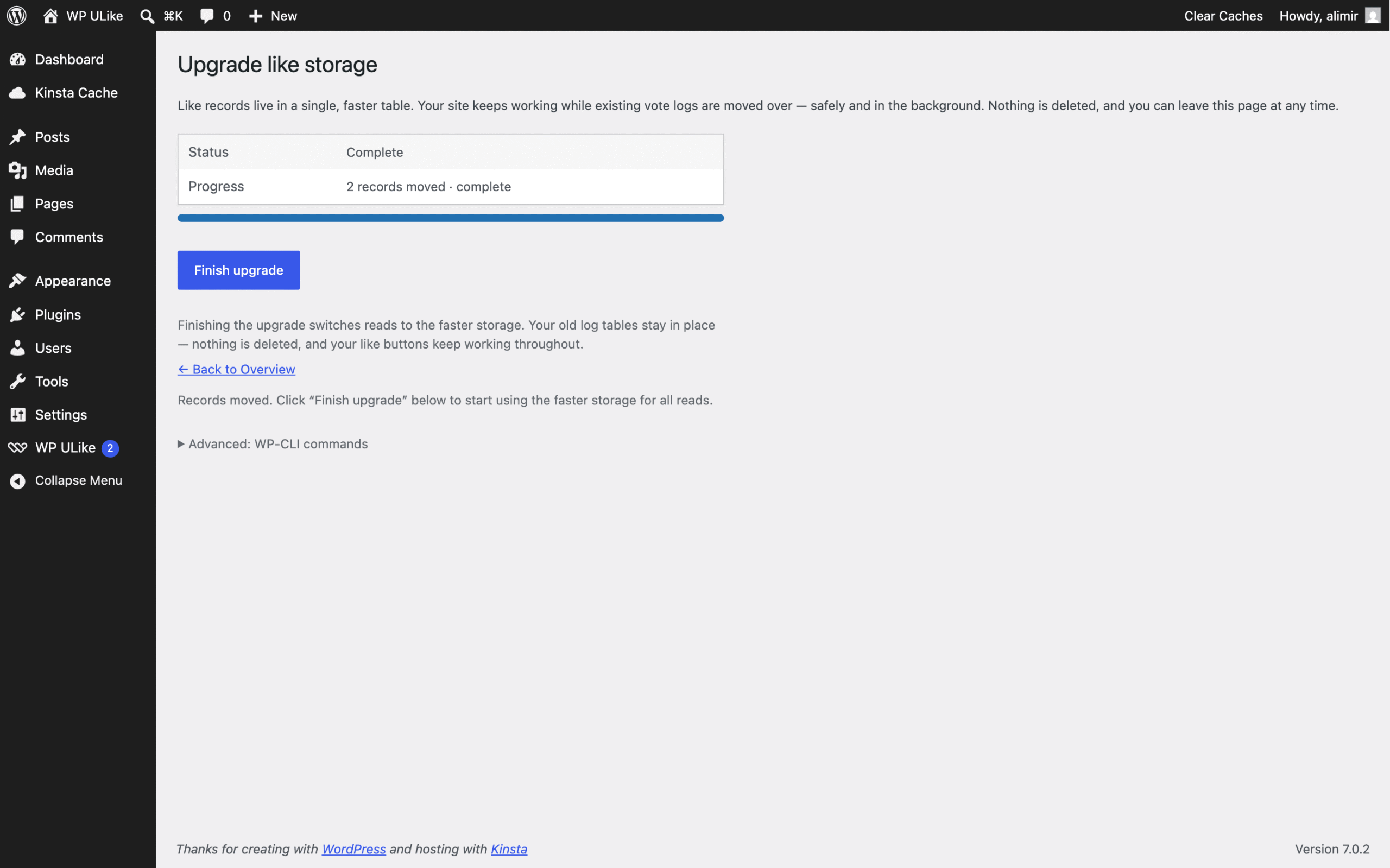
Nothing is deleted until you finish the upgrade and choose to remove old tables. Counts, buttons, and stats keep working the whole time. On large sites, you can pause, resume, or use WP-CLI if your host prefers command-line ops.
Free vs Pro: how Pulse is shared
Free WP ULike (5.2+) owns Pulse: the storage engine, migration UI, Site Health checks, and classic like/dislike writes.
WP ULike Pro (2.3+) writes emoji and star engagements into that same engine, and reads Pulse for deeper Statistics, top lists, logs, and engagers. Pro requires free 5.2.0 or later (5.2.1 recommended).
Both plugins stay installed together. Pulse is not a separate product. It is the shared foundation.
How Pulse modes work (plain English)
- Legacy. Older path only. Edge case before cutover.
- Dual. New classic votes write to Pulse. Reads merge old tables with Pulse so totals stay right. Typical for sites that just updated and still have history to move.
- Pulse. Read and write Pulse only. Fresh installs start here. Fully upgraded sites finish here.
You usually do not pick a mode by hand. Update free to 5.2+, and WP ULike puts you on the safe path automatically.
What you should do after updating
- Update WP ULike to 5.2 or later (5.2.1 recommended).
- If you use Pro, update to 2.3 or later so emoji, stars, and Pulse-backed stats stay in sync.
- Purge any full-page cache once after the update.
- Open WP ULike → Storage Upgrade when you are ready. Run the background move, then finish the upgrade.
- Optional: remove old tables after you verify counts look right.
If you skip Storage Upgrade for a while, that is fine. Your site keeps working. Dual mode exists so you can upgrade on your schedule, not ours.
Privacy and everyday tools still apply
Pulse did not replace your privacy story. GDPR export and erase cover Pulse rows. Site Health can flag storage status. Large hosts can use WP-CLI for status, sync, verify, and cleanup steps when a UI pass is not enough.
For visitors, nothing changes in a flashy way. Buttons still feel like WP ULike. Under the hood, the engine is ready for richer reactions and faster reports.
How this fits emoji reactions and star ratings
If you are evaluating Pro’s Emoji Reactions or Star Rating templates, Pulse is why those features can share Statistics with classic likes instead of living in a side database.
Ask for a quick yes (like), a feeling (emoji), or a score (stars). Same dashboard. Same upgrade path. Same free plugin underneath.
Update, then decide when to finish
Pulse is the foundation for the next chapter of WP ULike: faster storage, flexible reaction kinds, and Statistics that scale with your audience.
Update free to 5.2+. Update Pro to 2.3+ if you use it. Open Storage Upgrade when you want the full speed win. Your existing votes stay.
Update WP ULike on WordPress.org · Get WP ULike Pro · Documentation
Frequently asked questions
What is WP ULike Pulse in one sentence?
Pulse is the unified engagement storage engine that holds classic likes, Pro emoji reactions, and star ratings in one faster place.
Do I have to migrate right away?
No. After updating, dual mode keeps counts correct while old and new storage work together. Finish Storage Upgrade when you are ready.
Will Pulse change my like buttons or wipe votes?
No. Counts, buttons, and stats keep working. Nothing is deleted until you finish the upgrade and choose to remove old tables.
Which versions do I need?
Free WP ULike 5.2.0 or later (5.2.1 recommended). For Pro emoji, stars, and Pulse-backed Pro stats, use WP ULike Pro 2.3.0 or later.
Where is Storage Upgrade?
Go to WP ULike → Storage Upgrade after you update free to 5.2+.
Is Pulse only for Pro?
No. Free owns Pulse and uses it for classic likes and Statistics. Pro adds emoji and star engagements on top of the same engine.
Will Statistics break during the upgrade?
No. Mode-aware reads keep classic vote totals correct in dual mode, and Pro reaction data already lives in Pulse. Full Pulse mode makes the query path even cleaner.


Leave a Reply