


Another password. Another form. Another visitor who bounces before they vote.
Social login fixes that. WP ULike Pro supports 13 networks — Google, Facebook, GitHub, LinkedIn, Apple, X (Twitter), and more — so users sign in from your front-end login forms with one click.
This guide covers how WordPress social login works in WP ULike Pro, where to configure it, and how it connects to voting and profiles. Social login is Pro-only and lives alongside AJAX login, 2FA, and email verification under the same account system. For the full login picture, see our AJAX login and registration guide.
What is social login?
Social login (also called social sign-in) lets visitors authenticate with an account they already have — Google, Facebook, GitHub, etc. — instead of creating a new username and password on your site.
WP ULike Pro creates a standard WordPress user from the provider’s verified email. That user can vote under their account, appear in top-likers lists, and open a public profile. No parallel user table. No third-party membership SaaS in the middle.
Why add social login to a WP ULike site?
WP ULike is built for engagement. Anonymous likes are useful; logged-in engagement is better when you care who reacted.
- Fewer abandoned signups — no password to invent or remember
- Faster path to voting — sign in, then like, in seconds
- Vote history tied to users — profiles and stats can show who engaged
- One stack — social login ships with Pro login forms; no Nextend or separate OAuth plugin required
If you run a blog, community site, or BuddyPress-powered platform, social login lowers the wall between reading and participating.
Supported networks
WP ULike Pro supports 13 social networks. Enable only the ones your audience uses — each needs OAuth credentials from that provider’s developer console:
- GitHub
- X (Twitter)
- Amazon
- Apple
- WordPress.com
- Yahoo
- Slack
- Medium
- Dribbble
- PayPal
You can add multiple providers at once and set custom labels for each button in the admin. Google and Facebook are the most common starting points; GitHub suits dev communities; LinkedIn fits B2B and publisher sites.
Each provider needs an app ID and secret from that platform’s developer console — e.g. Google Cloud Console or Meta for Developers. WP ULike handles the OAuth redirect back to your site. Field-by-field setup is in our social login documentation.
Where to configure social login
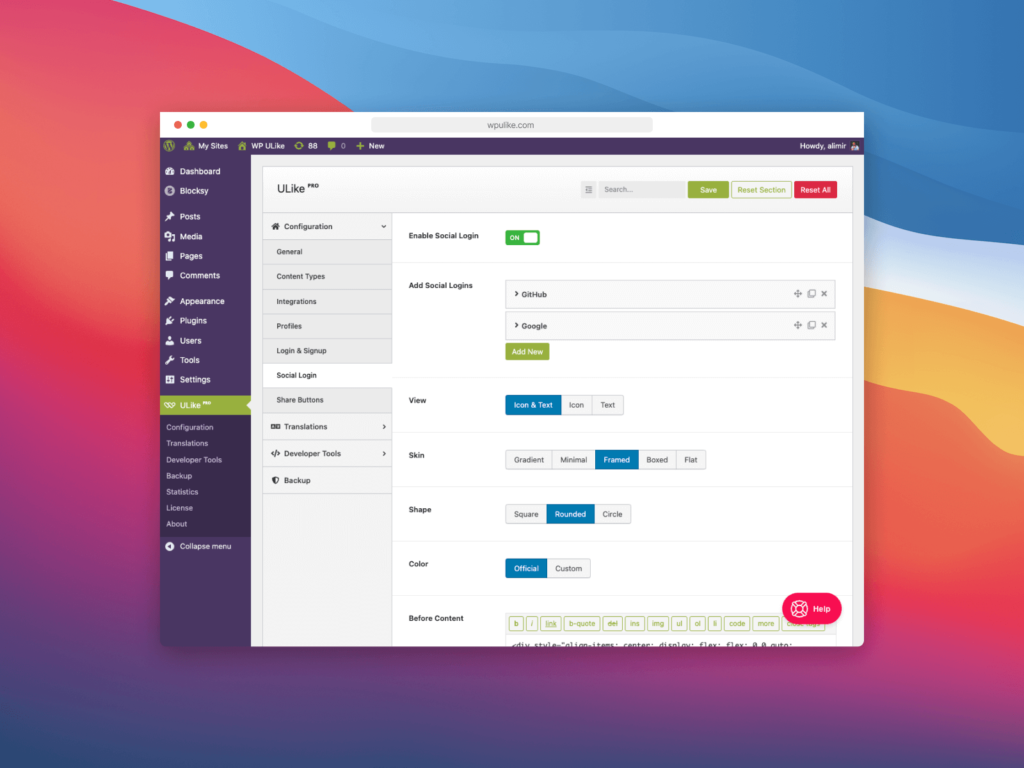
Social login has its own settings screen: WP ULike → Settings → Configuration → Social Login.
That panel is separate from Login & Signup (which handles form pages, redirects, reCAPTCHA, 2FA, and email templates). Use Configuration → Social Login for:
- Adding and enabling social providers (all 13 networks)
- App ID, secret, and callback URLs per platform
- Custom button labels per network
- Auto display — None, After Login Form, Before Button, or Custom Hook
- Manual placement via the
[ wp_ulike_pro_social_login ]shortcode anywhere on your site
Button styling is handled in the Customizer (V5). OAuth providers and placement rules live under Configuration → Social Login. Form behavior and account security stay under Login & Signup.
Customization options
Social login should look like it belongs on your site, not like a generic widget dropped in from elsewhere.
- Auto display — attach buttons to login forms automatically (after form, before button, custom hook) or disable and use the shortcode only
- Shortcode — place
[ wp_ulike_pro_social_login ]on any page or template - Provider mix — enable all 13 networks or just Google + Facebook + GitHub, depending on your audience
- Custom labels — rename buttons per network in Configuration → Social Login
- Appearance — style social buttons in the Customizer to match login templates
Full customization details: Social logins settings (docs).
Security and privacy
Social login means trusting OAuth — users authenticate with Google, Facebook, or GitHub; your site receives a verified token, not their password. WP ULike Pro layers additional protections on top:
- reCAPTCHA v2/v3 on registration and login forms
- Email verification when you want to confirm addresses on new accounts
- Two-factor authentication (2FA) for users who want TOTP on top of any login method
- Rate limiting on login and signup attempts
Social providers are third-party services — mention them in your privacy policy. Routine vote data still stays in your WordPress database; OAuth traffic goes to the provider you enabled. Read our GDPR privacy guide for how Pro handles user data and erasure.
How social login fits the Pro toolkit
Social sign-in is one piece of WP ULike Pro’s account layer:
- AJAX login and registration — forms social buttons attach to
- User profiles — badges, tabs, liked-post lists after sign-in
- Voting — likes and dislikes stored with user IDs
- Analytics — top users and engagement trends in the stats panel
- AutomatorWP — trigger actions when users register or hit vote milestones (integration guide)
Social login is not a membership plugin. It won’t gate paid content or replace BuddyPress. It removes friction so more people become logged-in participants on your engagement-focused site.
Note: Social login is separate from Schema Generator / Google star ratings. Schema turns vote counts into structured data for search. Social login handles how users sign in. Both are Pro features; they solve different problems.
Getting started
- Install WP ULike and WP ULike Pro
- Create OAuth apps for each provider (Google, Facebook, GitHub, etc.) in their developer consoles
- Open WP ULike → Settings → Configuration → Social Login and enter OAuth app credentials for each provider
- Choose auto display or add
[ wp_ulike_pro_social_login ]via shortcode - Configure login form pages and redirects under Settings → Login & Signup
- Style buttons in the Customizer and test each enabled network on desktop and mobile
See Pro plans · Social login docs · 2FA guide
Frequently asked questions
Is social login included in free WP ULike?
No. Social login is a WP ULike Pro feature. Free covers voting and core stats. Pro adds login forms, social sign-in, profiles, and the rest of the account toolkit.
Where do I configure social login in WordPress?
Go to WP ULike → Settings → Configuration → Social Login. Add providers, OAuth keys, auto-display rules, and custom labels there. Login form pages and redirects are under Settings → Login & Signup.
Which social login networks does WP ULike Pro support?
Thirteen networks: Facebook, GitHub, Google, Twitter (X), Amazon, LinkedIn, Apple, WordPress.com, Yahoo, Slack, Medium, Dribbble, and PayPal. Enable only the ones you need.
Can I use Nextend Social Login with WP ULike instead?
WP ULike Pro includes built-in social login on its own forms. You don’t need a separate social login plugin for standard Pro login and registration. Third-party plugins may conflict — test carefully if you run both.
Does social login work with BuddyPress?
Yes. Social login creates standard WordPress users. WP ULike extends BuddyPress with voting; it doesn’t replace BuddyPress. Users who sign in via Google or Facebook can participate in BuddyPress activity and WP ULike voting under the same account.
Does social login add Google review snippets?
No. Social login handles authentication. Google star ratings in search come from WP ULike Pro’s Schema Generator, which turns vote counts into structured data. See our Schema Generator guide.




Leave a Reply