

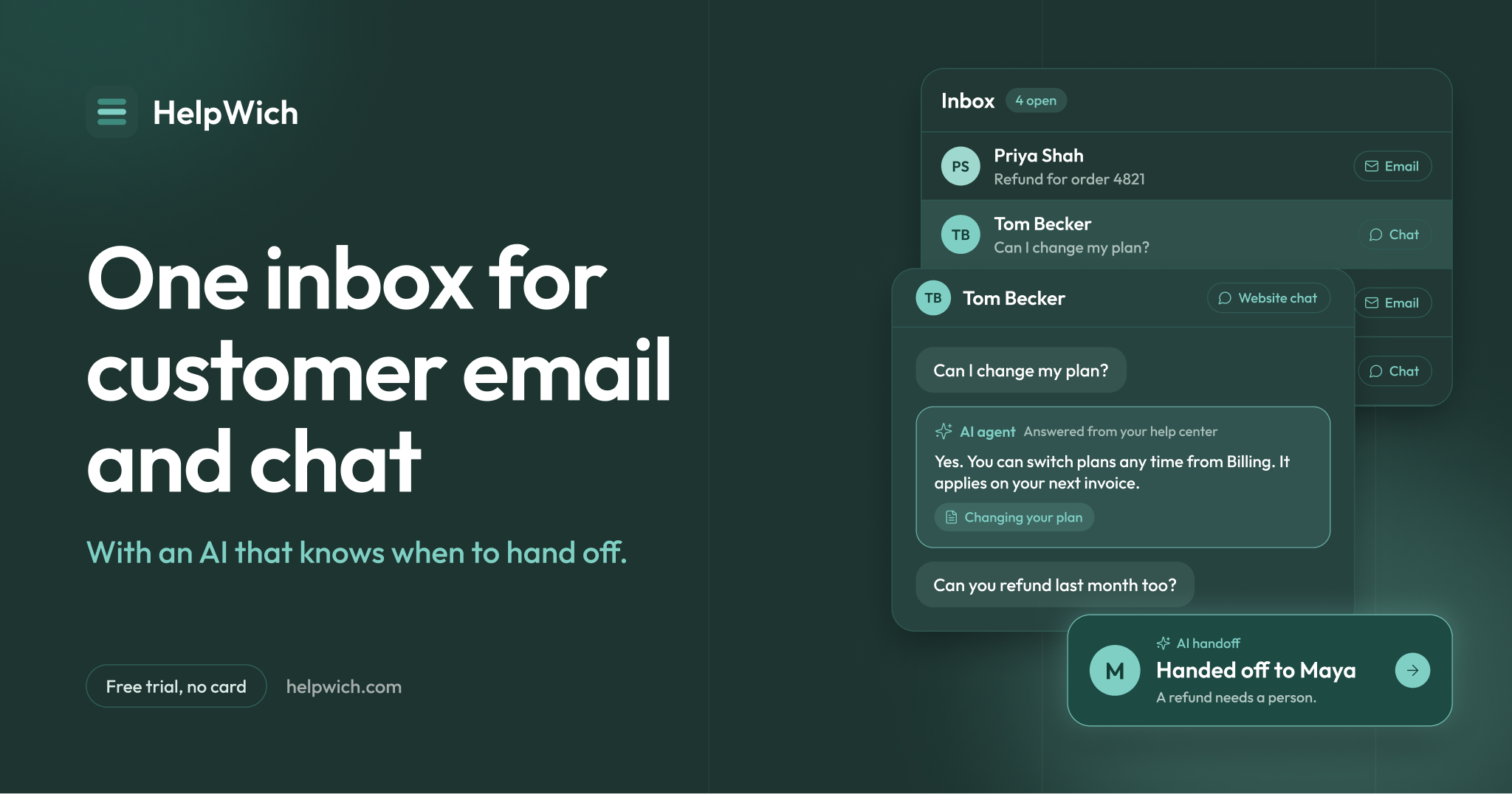
Customer support usually starts in a Gmail tab, a contact form and a chat widget that nobody checks on weekends. It works until two people answer the same customer, or nobody does. HelpWich fixes that with one inbox for customer email and website chat, an AI agent that answers the easy questions, and a help center, all in one app that is simple to set up.
Software companies and online stores use HelpWich on any platform, and it fits a WordPress site especially well. If you sell with WooCommerce or Easy Digital Downloads, your orders show up right next to every reply, a shared inbox for WordPress stores without another plugin to maintain.
HelpWich is made by TechnoWich, the same team behind WP ULike. WP ULike users get 40% off, with the details at the end of this post.
What is HelpWich?
HelpWich is one inbox for the email and website chat your customers send. Your team sees every conversation in one list, takes the ones they will answer, and replies from your own address. An AI agent can answer the easy questions from your help center and pass the rest to a person, with a private note on why.
It is a hosted app, so there is nothing to install or update, it adds no load to your server, and it keeps working even if your site is down.
Why growing sites move support out of a plugin
Support plugins store tickets in your site’s database and send mail through your host. That is fine for a few messages a week. As you grow, a dedicated shared inbox has clear advantages:
- Every message has an owner. A teammate takes a conversation and everyone else can see it, so nobody replies twice.
- Email and chat in one list. A customer who starts in chat and follows up by email stays in one history.
- Your own address. Replies go out from support@yoursite.com, not from a ticket system address.
- No extra load on your site. Your database and hosting stay focused on your visitors.
Up and running in three steps
- Connect your support email. Customers keep writing to the address they know.
- Add the chat widget. Paste one snippet into your site.
- Connect your store. Add a WooCommerce or Easy Digital Downloads API key and orders appear beside each conversation.
No developer, no server setup, and your team can start answering the same day. Moving from another help desk? You can bring your old conversations with you.
What you get
Your store beside every reply
Connect WooCommerce or Easy Digital Downloads and HelpWich shows the customer’s orders, subscriptions, licenses and lifetime value next to the conversation. Customers are matched by email, and WooCommerce guest checkouts are matched by billing email. You answer “where is my order?” without opening wp-admin.
HelpWich also connects with Shopify, Stripe, GitHub and Slack, and a custom app can show data from any system with a URL. As your business grows past one site, your support tool grows with it.
An AI agent that knows when to hand off
The AI agent answers from what you give it: a description of your business, your rules, saved replies and your published help articles. In chat it can take every conversation, or only when your team is away. By email it can write a draft for a person to send, or reply on its own only when it is confident.
It does not see your orders, licenses or invoices. Refunds, account changes and anything about a specific order go to a person. That keeps the AI helpful without letting it make promises about money.
Website chat and a help center
Add the chat widget to your WordPress site with one snippet. Publish help articles in HelpWich Docs, and the same articles power the AI agent’s answers, so you write each answer once.
Reports and ratings
See how fast you reply, how many conversations are waiting, and what customers think of the answers they got. See reports and ratings.
Security built in
Two-factor sign-in and passkeys, team roles, IP allowlists, an audit trail and a published DPA. Customer mail is handled the way a serious business expects. Read how HelpWich protects your data.
HelpWich pricing
One flat price per team, not per seat. Email, website chat and the AI agent are on every plan. Compare every plan.
| Plan | Monthly | With WP ULike offer | Team members | Inboxes |
|---|---|---|---|---|
| Standard | $29 | $17.40 for 3 months | Up to 5 | 2 |
| Plus | $59 | $35.40 for 3 months | Up to 15 | 8 |
| Pro | $119 | $71.40 for 3 months | Up to 50 | 25 |
40% off for WP ULike users
As a thank you to the WP ULike community, you get 40% off your first 3 months on a monthly plan, or 40% off your whole first year on an annual plan. Start with a free trial, no card needed. The discount is applied for you at checkout when you use the button below.
For new HelpWich accounts. 14-day money-back guarantee on paid plans.
Frequently asked questions
No. HelpWich is a hosted app that works with any website, WordPress included. You connect your support email, add the chat snippet to your site, and connect WooCommerce or Easy Digital Downloads with an API key. Nothing extra runs inside WordPress.
Yes. HelpWich works with any website or app. One workspace can hold several inboxes, so each brand or site keeps its own address.
Yes. Customers keep writing to the address they know, and your replies go out from it.
No. Your team sees orders in the sidebar, and the agent hands order and refund questions to a person.
Yes. On an annual plan it takes 40% off your entire first year.
No proof is needed. Use the button in this post and the discount is applied at checkout for new HelpWich accounts.

Leave a Reply