

Managing a WordPress site goes far beyond publishing content. As your site grows, so does the volume of engagement data, user privacy requests, and background cleanup needed to keep everything running smoothly.
If you’re using WP ULike Pro, you’ve probably already seen how powerful engagement tracking can be — but managing that data manually can still be time-consuming. This release focuses on making it easier to manage engagement in WordPress by combining bulk controls, built-in privacy tools, and practical maintenance features in one place.
Rather than adding more complexity, the goal was simple: reduce friction in everyday site management.
Bulk Actions That Make Engagement Management Scalable
Bulk actions are the backbone of this release in WP ULike Pro, especially for sites with growing content libraries or active communities.
Instead of adjusting likes and dislikes one item at a time, you can now manage engagement across multiple items safely and efficiently.

Filter First, Then Act
Before making any changes, you can narrow down exactly what you want to work on:
- Filter by post type, including custom post types
- Filter by taxonomy and categories
- Target specific item IDs
This makes bulk actions intentional and predictable, even on large sites.
Individual Editing When Precision Matters
While bulk tools save time, precision still matters. Individual edit mode lets you adjust likes and dislikes per item while clearly showing current values, helping avoid accidental overwrites.
Bulk Operations Designed for Real Use
WP ULike Pro supports three practical bulk operation modes:
- Add specific values
Ideal for campaigns or content promotions where consistent boosts are needed. - Set exact values
Useful for resets, standardization, or cleaning up engagement data after migrations. - Apply random ranges
Designed to distribute engagement naturally, avoiding obvious patterns.
These options exist to match real workflows, not artificial use cases.
Where Bulk Actions Save the Most Time
- Migrating large content libraries
- Running site-wide marketing campaigns
- Fixing inconsistencies after imports or conflicts
- Testing how engagement affects user behavior
What once required hours of manual work can now be handled in minutes.
Built-In GDPR Tools for User Data Control
User privacy is a serious responsibility, and handling GDPR requests manually can be stressful and error-prone.
WP ULike Pro includes dedicated GDPR tools that make it easy to locate users and permanently remove their engagement data in a safe, controlled way.
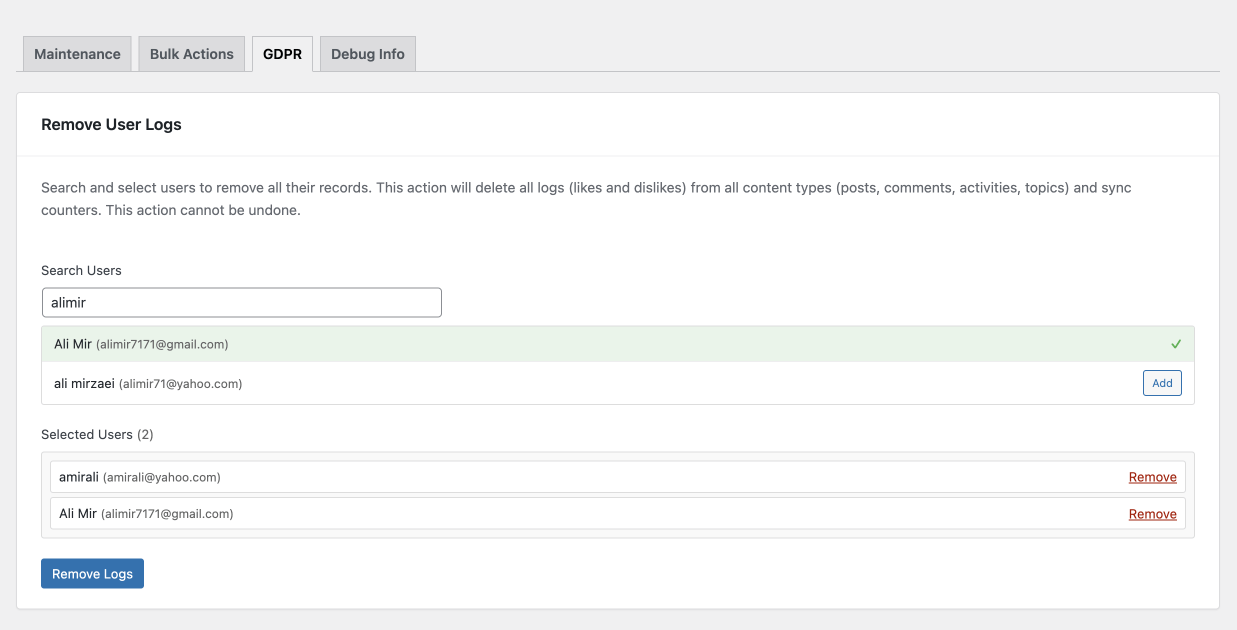
How GDPR Removal Works
- Search users by name or email
- Select one or multiple users
- Remove all related engagement logs in one action
This applies across posts, comments, BuddyPress activities, and bbPress topics. After removal, counters are automatically synced to keep site statistics accurate.
Why This Matters for Site Owners
- Helps meet GDPR “right to be forgotten” requirements
- Reduces admin workload
- Prevents broken engagement counts
- Builds trust with your audience
Privacy management becomes a clear process instead of an ongoing concern.
Maintenance Tools That Keep WP ULike Pro Clean and Fast
Engagement data grows over time, and without proper cleanup, performance can suffer. That’s why WP ULike Pro includes a comprehensive set of maintenance tools focused on long-term stability.
Content-Focused Maintenance
For posts, comments, BuddyPress activities, and bbPress topics, you can:
- Delete all records when starting fresh
- Remove invalid or orphaned records
- Eliminate duplicate entries
- Recalculate and sync counters
- Optimize database tables
Additional Cleanup and Utilities
- Remove stored user vote status
- Clear statistics cache
- Remove empty post settings
- Create or delete required default pages
Data Conversion and Migration Support
When upgrading or migrating, you can:
- Move counters to WordPress standard meta tables
- Convert data formats for better performance
- Safely remove legacy data after migration
Cache, Repair, and Optimization
- Clear all cache, including popular caching plugins
- Remove transients and expired sessions
- Repair database tables
- Analyze tables and sync indexes
Each tool includes clear descriptions and safeguards so actions are always transparent.
Why These Features Work Better Together
Bulk engagement control, privacy tools, and maintenance features are useful on their own. Together, they form a practical system for managing engagement at scale with WP ULike Pro.
You spend less time fixing data
You stay compliant without stress
And your site remains fast and reliable as it grows
That’s the real value behind this release.
Getting Started
All of these tools are available from the Tools section inside WP ULike Pro. The interface is designed to be self-explanatory, with inline descriptions and warnings where actions are irreversible.
Tip: After migrations or major updates, start with maintenance tools. Use bulk actions for engagement adjustments, and keep the GDPR section bookmarked for future requests.
Final Thoughts
These features weren’t built to impress on a feature list. They were built to make everyday WordPress management calmer and more predictable.
If you’re running anything from a personal blog to a high-traffic community site, WP ULike Pro is now better equipped to handle engagement, privacy, and cleanup without unnecessary complexity.
As always, feedback helps shape what comes next. Try the new tools and let us know how they fit into your workflow.